
From App to Drive-Thru: Mapping the Restaurant Media Opportunity
A guest orders lunch through your app. Another uses a kiosk. A third drives past a digital menu board before collecting an order placed earlier.
Each interaction creates a different advertising opportunity. The value depends on what the guest is doing, what the placement can communicate, and which advertiser has a reason to be there.
In our introduction to restaurant media networks, we explored how restaurant brands can become media owners. The next step is to map the inventory: where advertising can fit, what role each touchpoint plays, and how those placements could work together.
From AdButler’s perspective, that map should connect the guest experience to a clear commercial offer. Advertisers need to understand what they are buying, while restaurant teams need a practical way to deliver it.
At a glance: Mapping restaurant media inventory
- Different touchpoints serve different purposes: An app placement can support product discovery, while a pickup-area screen can reach guests after their purchase.
- Context shapes the offer: Location, daypart, menu category, and ordering stage help determine which campaigns fit.
- Connected campaigns need channel-specific creative: A newsletter sponsorship and a drive-thru placement should communicate differently.
- Inventory needs clear definitions: Sellable placements require agreed availability, delivery rules, ownership, and reporting.
Start with the guest’s task
Before deciding where an ad could appear, ask what the guest is trying to accomplish.
Someone browsing the menu may welcome a relevant product suggestion. Someone entering payment details needs to finish checkout. A guest waiting for collection has a different amount of time and attention available.
These distinctions should shape the inventory. A screen’s size or an app’s traffic can help describe its potential, but neither explains whether a placement belongs in that moment.
A useful starting map looks like this:
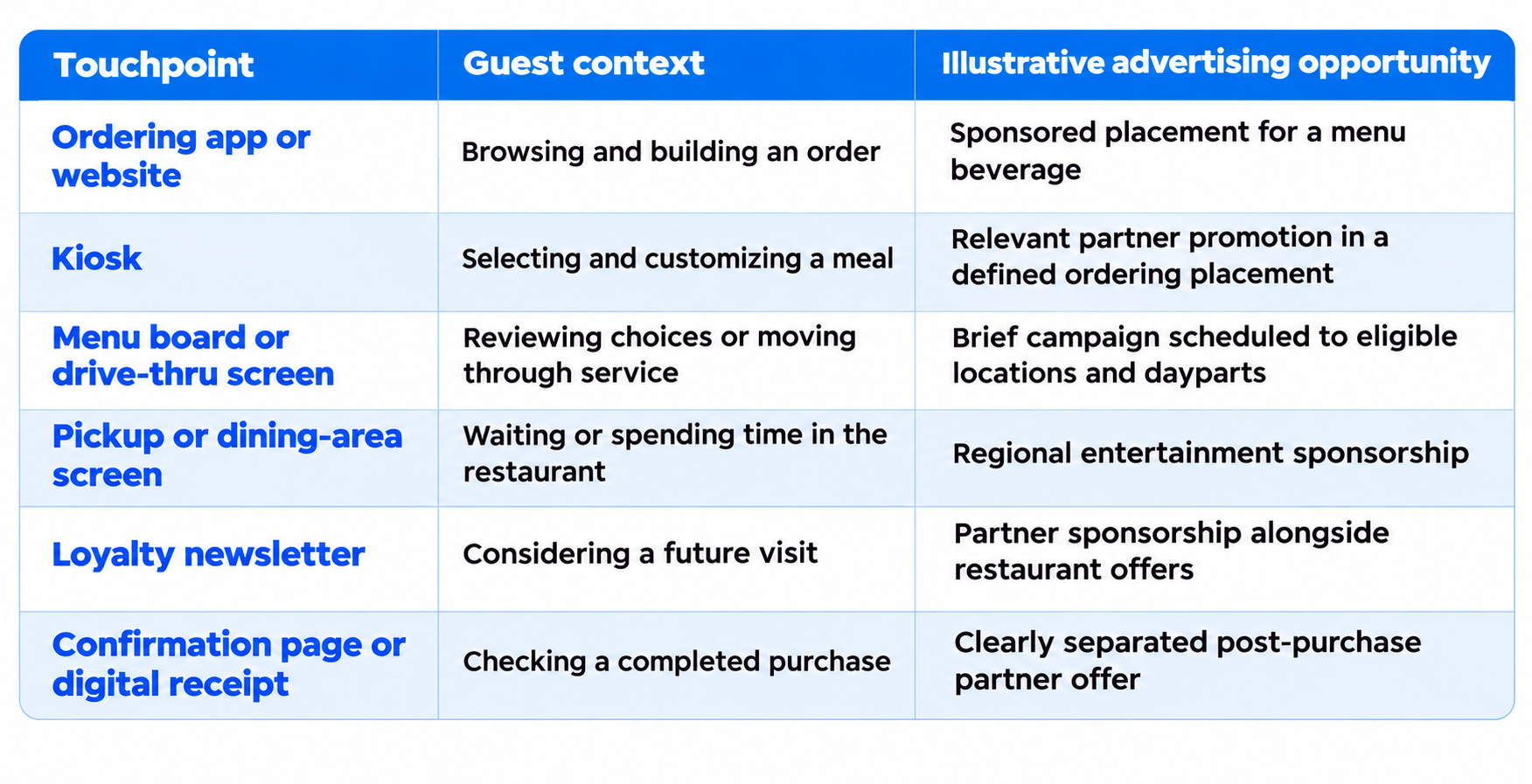
These are potential placements, subject to the restaurant’s systems, agreements, and guest experience requirements. Guests can encounter them in different combinations; the map does not assume a fixed journey.
Turn your inventory map into a plan. Download the Restaurant Media Network Playbook to explore how apps, loyalty communications, kiosks, and screens can support an advertising business.
Ordering apps and websites: Help advertisers reach a relevant decision
Ordering environments offer context about what a guest is browsing and where they are in the purchase process.
For a beverage partner, a placement near an eligible menu category may be more useful than a general banner elsewhere in the app. The offer can be explained around a specific occasion, such as lunch orders at participating restaurants.
The restaurant should define the placement precisely. “App advertising” is broad. “A sponsored card within the lunch menu at selected locations” gives the buyer a clearer product.
Creative should also fit the environment. A concise message, recognizable product image, and clear action are easier to accommodate than an ad that interrupts navigation.
AdButler’s Mobile Ad Server provides mobile integration options and campaign controls for in-app advertising. The restaurant’s app team still determines the placement layout, the signals available for decisions, and the events recorded for reporting.
Kiosks: Build around the ordering session
Kiosks put advertising close to a purchase, but they are also working service tools. Guests need to navigate the menu, customize items, and complete payment confidently.
A suitable placement could introduce a relevant partner promotion during browsing. Its timing should reflect the ordering session, with clear rules on repetition and what happens when no eligible campaign is available.
For example, a hypothetical beverage campaign could promote an available drink before checkout. That requires coordination with menu availability and the kiosk interface so guests receive an offer they can actually select.
A kiosk session may also support useful interaction reporting where instrumented. It should not automatically be treated as an identified loyalty customer or linked to advertising encountered elsewhere.
Digital screens: Location and timing become part of the product
Restaurant screens serve different audiences. A drive-thru menu board, pickup-area display, and dining-room screen should each have a distinct role in the inventory map.
Drive-thru creative needs to be brief and readable. Essential menu and service information should retain priority. Pickup and dining-area screens may offer more room for messages relevant to guests who have already ordered.
This creates opportunities to sell campaigns by restaurant group, region, or daypart. A local entertainment venue, for example, might value selected pickup-area screens in its market more than a broad package across unrelated locations.
AdButler’s Digital Out-of-Home solution supports scheduling, targeting, and ad decisioning APIs. Restaurant deployments need integration with the signage player or content management system responsible for rendering the campaign.
Reporting should reflect the environment. IAB Europe and IAB’s in-store media standards distinguish ad plays from audience measures such as opportunity to see. Restaurants should make the same distinction when explaining screen campaigns to buyers.
Loyalty communications: Reach beyond the current order
Loyalty newsletters can introduce a campaign before a guest decides to visit. That gives them a different role from placements inside an active ordering session.
An eligible newsletter could include a beverage sponsorship alongside a restaurant’s seasonal promotion. AdButler’s Email Ad Server can support advertising placements within newsletter templates, with the email provider and rendering behavior considered during implementation.
Push notifications require a separate decision. Permission to receive restaurant updates should not be assumed to cover every type of partner promotion, and another message can quickly feel intrusive.
Confirmation pages and digital receipts also need their own rules. Any partner offer should be clearly separated from order details, collection instructions, and other information the guest needs.
Give connected campaigns a clear purpose
Once the surfaces are mapped, restaurants can consider how a buyer might use more than one.
Take a hypothetical beverage launch. An eligible loyalty newsletter could introduce the product before a visit. An app placement could feature it during menu browsing, while selected restaurant screens support awareness during the campaign period.
The campaign shares an objective, but each placement needs appropriate creative and delivery rules. Screen playback, email interactions, and app activity should remain distinguishable in reporting.
A connected campaign also does not require proof that the same person encountered every placement. Restaurants can sell coordinated activity across channels while being clear about where audience overlap is known, estimated, or unavailable.
Make the map usable for sales and operations
An inventory map becomes commercially useful when each placement has a consistent definition.
Record where it appears, which locations participate, when it is available, what creative it accepts, and how delivery is measured. Establish who can approve campaigns and whether the placement can be sold nationally, locally, or both.
This is where shared infrastructure matters. Commerce Catalyst provides AdButler’s enterprise ad tech foundation for media network operations, with campaign decisioning and workflows across media environments.
Connections to ordering, loyalty, signage, and transaction systems need to be defined for the deployment.
Our view is that restaurant brands should be able to develop their offer without rebuilding campaign operations for every additional channel.
A clear inventory structure gives sales teams something understandable to sell and operations teams something repeatable to deliver.
Turn your inventory map into a plan. Download the Restaurant Media Network Playbook to explore how apps, loyalty communications, kiosks, and screens can support an advertising business.
Which touchpoints belong in your first campaign?
Start with the placements where guest context, advertiser relevance, and operational readiness align. That might be an app sponsorship and a loyalty newsletter, or a focused group of connected restaurant screens.
The strongest starting point is one your team can explain, deliver, and improve. Additional surfaces should earn their place through advertiser value and a guest experience that continues to work.
Your restaurant already connects with guests in several ways. Let’s explore how those touchpoints could work together as a media opportunity.
Turn your inventory map into a plan. Download the Restaurant Media Network Playbook to explore how apps, loyalty communications, kiosks, and screens can support an advertising business.
FAQs
Which restaurant channels can support advertising?
Potential channels include ordering apps and websites, kiosks, digital menu boards, drive-thru displays, other restaurant screens, and eligible loyalty communications. Availability depends on placement rights, technical readiness, and guest experience requirements.
Should every restaurant screen carry advertising?
Each screen needs an assessment of its primary purpose, viewing conditions, and available space. Advertising should preserve essential menu, ordering, and service information.
Can one campaign run across apps, email, and restaurant screens?
Yes, where those channels are integrated and commercially available. The campaign needs channel-specific creative, delivery rules, and reporting definitions. Reaching the same individual across every channel should not be assumed.
Do restaurants need to identify guests to target campaigns?
No. Contextual campaigns can use signals such as location, daypart, or menu category. Customer-level targeting requires appropriate permissions and the relevant data integrations.
Which touchpoints should a restaurant launch first?
Choose placements with clear advertiser relevance, established operating rights, reliable delivery, and useful reporting. Starting with a focused offer makes it easier to assess demand and operating costs before adding channels.
